Overview
The Account Settings section lets you set up the core details that control how meetings and voting are managed in BuildingBoard. From here, you can review and update key information, such as property details, voting and quorum settings, notice requirements, and management contact information. This article explains how to access and update these settings to ensure your meetings are configured correctly before scheduling and sending notices.
Table of Contents |
Note: Click on the images to enlarge them.
Building Information
Update the legal name and address of the property.
Voting and Quorum
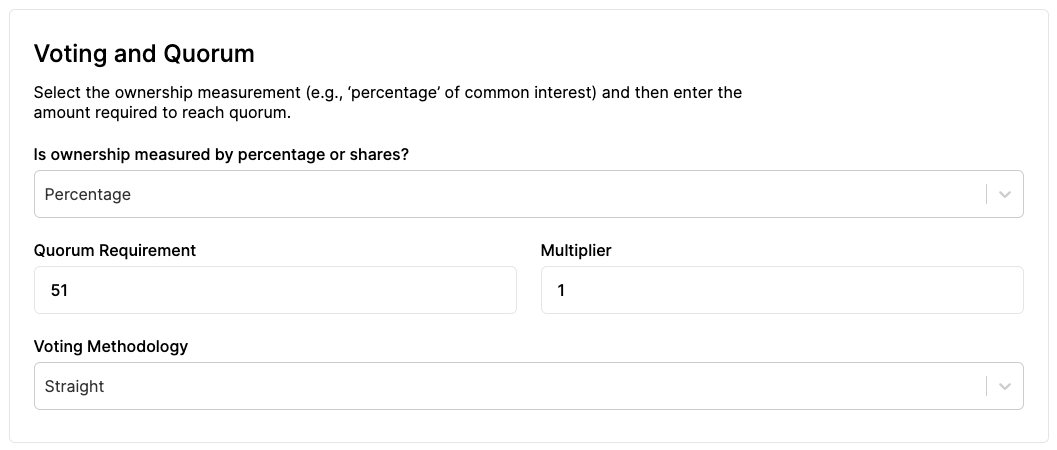
- Select your property to be either a percentage ownership or a number of shares.
- Set up your quorum requirement as either a number reflecting ownership percentage or a number of shares.
- If your property has a voting multiplier based on the number of shares an owner has, enter under "multiplier" - otherwise leave as "1."
- Select your voting methodology to be either a straight or cumulative vote.
Notice Requirements
By default, notice requirements in your Settings are based on local regulations, though you can update this if needed.
Management
Add the property manager's name and contact information here. The contact information entered here will also serve as the email "Sender".
To save each of these settings, select 'Update' at the bottom of the page.